- Google Unternehmensprofil
- Google Business Profile
- Local SEO
- Google Bewertungen
Optimising your Google Business Profile: the checklist for more local visibility
For local businesses the business profile is the most important page online. The basics, categories, photos, reviews – plus a checklist you can work through in 30 minutes a quarter.
For most local businesses the Google Business Profile is the most important page on the internet – more important than their own website. It decides whether somebody calls, looks up the route or scrolls on. And it is the one page you control completely.
This guide walks through the whole profile: the basics, categories, photos, posts, reviews – and ends with a checklist you can work through once a quarter.
Why the profile is more than a listing
Search for “dentist near me” or “bakery Cologne Ehrenfeld” and the first thing you get is a map with three entries. Everything inside those three boxes – name, stars, review count, opening hours, photo – comes from the business profile. The website appears below, if at all.
A well-kept profile therefore works twice: it raises the chance of being shown at all, and it raises the chance that somebody clicks once you are shown. Which factors decide the order is taken apart in Local ranking on Google.
The basics: boring, but decisive
- Name. Exactly as it appears on the door. Additions like “Dentist Cologne cheap” are not allowed under Google's policies and can get the profile suspended – the short-term effect is not worth the risk.
- Address and directions. Check where the pin actually sits on the map. In courtyards, shopping centres and business parks it is often wrong – and every wasted trip is a candidate for a bad review.
- Opening hours including public holidays. The most common reason for a completely avoidable 1-star review: “stood in front of a locked door.” Holidays and closures belong in the profile before they happen.
- Phone number and website. A number somebody answers, a link that does not lead to a construction site.
Keep these details identical everywhere – on your website, in your imprint, in directories. Contradictory details are a signal of uncertainty for Google and an annoyance for customers.
Categories and services
The primary category is one of the most powerful levers in the whole profile. It determines which searches you are even considered for. Pick the category that describes your core business most precisely – not the broadest one.
On top of that:
- Secondary categories for everything else you offer – but only if you really offer it.
- Services and products filled in. These are your customers' search terms, in their own words.
- Attributes set: step-free access, parking, online appointments, payment methods. For many searchers these are deal breakers.
Photos, posts, questions & answers
A profile without its own photos looks abandoned. Upload pictures from outside (so people recognise the entrance), from inside and of the team – real photos, not stock images. A few new ones every couple of months is enough.
Posts let you publish offers, news or seasonal notes directly in the profile. And in questions & answers the rule is: answer the most common questions yourself before somebody else does. You are allowed to post and answer your own questions there.
Reviews are part of profile upkeep
No part of the profile is read as closely as the reviews – and none affects visibility as strongly. Three things belong in the routine:
- Ask for reviews systematically. At the right moment, with a link or QR code, without pre-selecting and without offering anything in return. The full method is in How to improve your rating on Google Maps.
- Reply to every review. Short and personal for the good ones, factual for the bad ones – the guide to negative reviews has the templates.
- Submit policy-violating reviews. Reviews from competitors, from non-customers or containing harassment do not have to stay.
The quarterly checklist
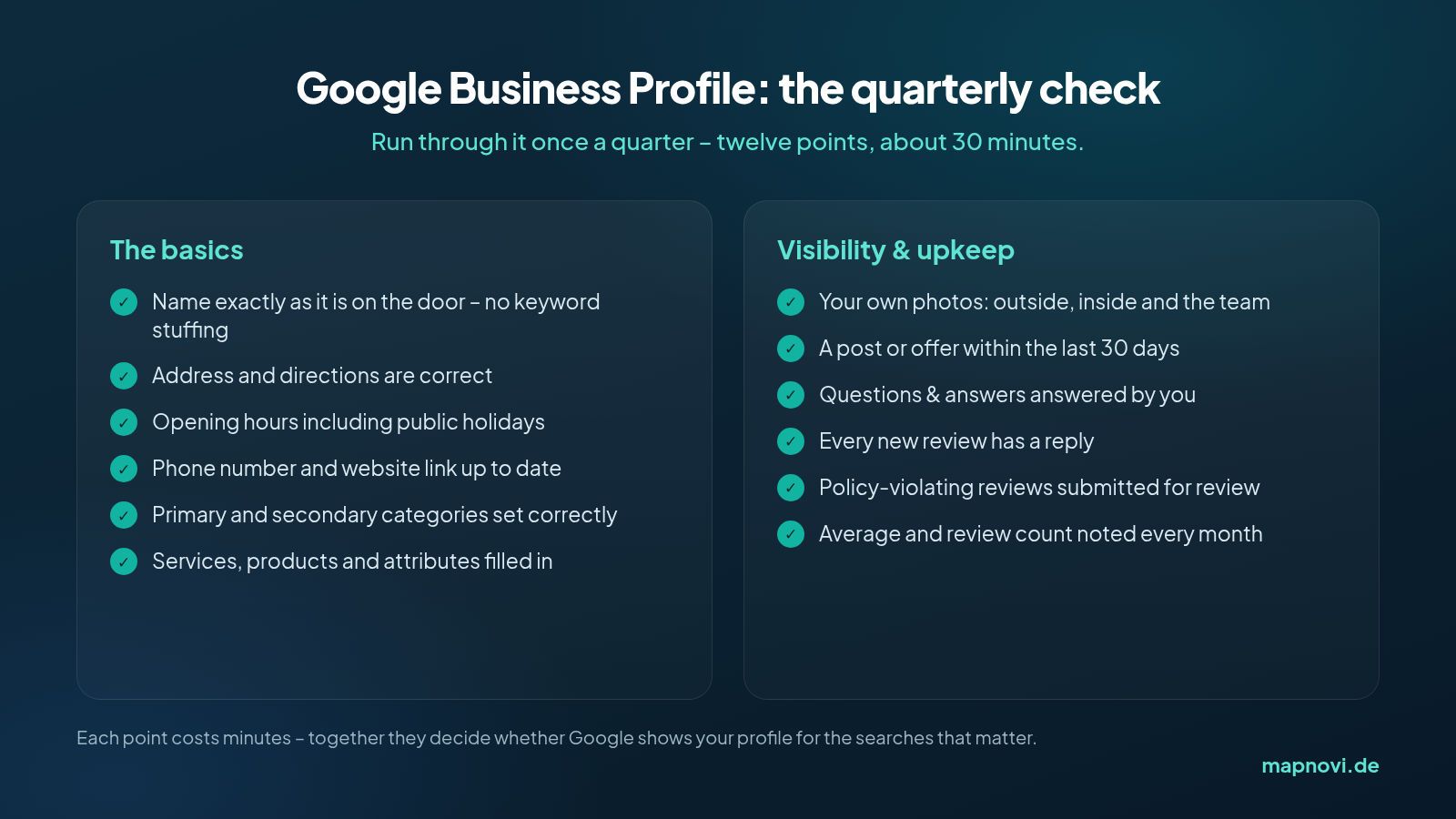
If you only want to put one appointment in the calendar for this: set it on the first working day of the quarter and work through this list. That is more profile care than most of your competitors manage.
Measure what the profile delivers
Google shows you inside the profile how often you appeared in Search and in Maps, which search terms brought people in and what they did next – call, directions, website click. Note those numbers once a month together with your review count and average.
Two patterns are worth watching. If views rise but calls do not, something is wrong with the first impression – photos, stars, opening hours. If review numbers rise but the average falls, the problem is not in the profile, it is in the business.
In short
Optimising a Google Business Profile is not a one-off project but a short routine: the basics are correct, the categories fit, the photos are current, the questions are answered, reviews are collected and replied to – and anything that violates the policies gets submitted.
With Mapnovi you select the reviews, we submit them for review – and billing follows the conditions in our Terms. You pay €0 when you submit.